4.1 Making Decisions with Conditional Statements
Questions
- How can my programs do different things based on data values?
In this lesson, we’ll learn how to write code that runs only when certain conditions are true.
Conditionals
We can ask Python to take different actions, depending on a condition, with an if statement:
num = 37
if num > 100:
    print('greater')
else:
    print('not greater')
print('done')
not greater
done
The second line of this code uses the keyword if to tell Python that we want to make a choice. If the test that follows the if statement is true, the body of the if (i.e., the set of lines indented underneath it) is executed, and “greater” is printed. If the test is false, the body of the else is executed instead, and “not greater” is printed. Only one or the other is ever executed before continuing on with program execution to print “done”:

Conditional statements don’t have to include an else. If there isn’t one, Python simply does nothing if the test is false:
num = 53
print('before conditional...')
if num > 100:
    print(num, 'is greater than 100')
print('...after conditional')
before conditional...
...after conditional
We can also chain several tests together using elif, which is short for “else if”. The following Python code uses elif to print the sign of a number.
num = -3

if num > 0:
    print(num, 'is positive')
elif num == 0:
    print(num, 'is zero')
else:
    print(num, 'is negative')
-3 is negative
Note that to test for equality we use a double equals sign == rather than a single equals sign = which is used to assign values.
Comparing in Python
Along with the > and == operators we have already used for comparing values in our conditionals, there are a few more options to know about:
>: greater than<: less than==: equal to!=: does not equal>=: greater than or equal to<=: less than or equal to
We can also combine tests using and and or. and is only true if both parts are true:
if (1 > 0) and (-1 >= 0):
    print('both parts are true')
else:
    print('at least one part is false')
at least one part is false
while or is true if at least one part is true:
if (1 < 0) or (1 >= 0):
    print('at least one test is true')
at least one test is true
True and False
True and False are special words in Python called booleans, which represent truth values. A statement such as 1 < 0 returns the value False, while -1 < 0 returns the value True.
Looking at our data
Let’s return to our dataset of book searches. We’re going to focus on three files:
2026-02-18_google-trends-search-1_VALUES.csv
2026-02-18_google-trends-search-2_VALUES.csv
Each file is for a different city, and contains a table with
- 8 books (rows)
- 61 months (columns)
Let us load the data for the first search. We’ll use pandas this time to see how to use data that has row and column labels, including dates (the columns are months).
import pandas

df = pandas.read_csv("2026-02-18_google-trends-search-1.csv", index_col=0)
print("Original data type of column labels:", df.columns.dtype)

# convert the column labels from strings like "2021-02-01" to datetimes.
months_str = list(df.columns)
months_datetime = pandas.to_datetime(months_str)
months_mapper = dict(zip(months_str, months_datetime))
df = df.rename(mapper=months_mapper, axis="columns")
print("Converted data type of column labels:",df.columns.dtype)
Original data type of column labels: str
Converted data type of column labels: datetime64[us]
Say we want to find out whether the month with the most searches was either
- after 2022, or
- before or in 2022
# calculate the month with the most searches, across all books.

# first, calculate the monthly sum across books
monthly_total_across_books = df.sum(axis=0)
print("Monthly total:\n", monthly_total_across_books)

# then, calculate the top month
top_month = monthly_total_across_books.idxmax()
print("Top month:", top_month)

# make a datetime variable for the end of the year 2022
end_2022 = numpy.datetime64("2022-12-31")

# evaluate whether the top month was after 2022 or in/before 2022
if top_month >= end_2022:
    print("The max number of searches occurred after 2022")
else:
    print("The max number of searches occurred in or before 2022")
The max number of searches occurred after 2022
Now let’s see whether search 1 and search 2 had the same top month.
df1 = pandas.read_csv("2026-02-18_google-trends-search-1.csv", index_col=0)
df2 = pandas.read_csv("2026-02-18_google-trends-search-2.csv", index_col=0)

months_str = list(df.columns)
months_datetime = pandas.to_datetime(months_str)
months_mapper = dict(zip(months_str, months_datetime))
df1 = df1.rename(mapper=months_mapper, axis="columns")
df2 = df2.rename(mapper=months_mapper, axis="columns")

top_month_df1 = df1.sum(axis=0).idxmax()
top_month_df2 = df2.sum(axis=0).idxmax()

if top_month_df1 < top_month_df2:
    print("Search 1 had its top month first")
elif top_month_df2 < top_month_df1:
    print("Search 2 had its top month first")
else:
    print("Searches 1 and 2 had the same top month")
Search 2 had its top month first
Challenge: How Many Paths?
Consider this code:
if 4 > 5:
    print('A')
elif 4 == 5:
    print('B')
elif 4 < 5:
    print('C')
Which of the following would be printed if you were to run this code? Why did you pick this answer?
- A
- B
- C
- B and C
Solution
C gets printed because the first two conditions, 4 > 5 and 4 == 5, are not true, but 4 < 5 is true. In this case only one of these conditions can be true for at a time, but in other scenarios multiple elif conditions could be met. In these scenarios only the action associated with the first true elif condition will occur, starting from the top of the conditional section.
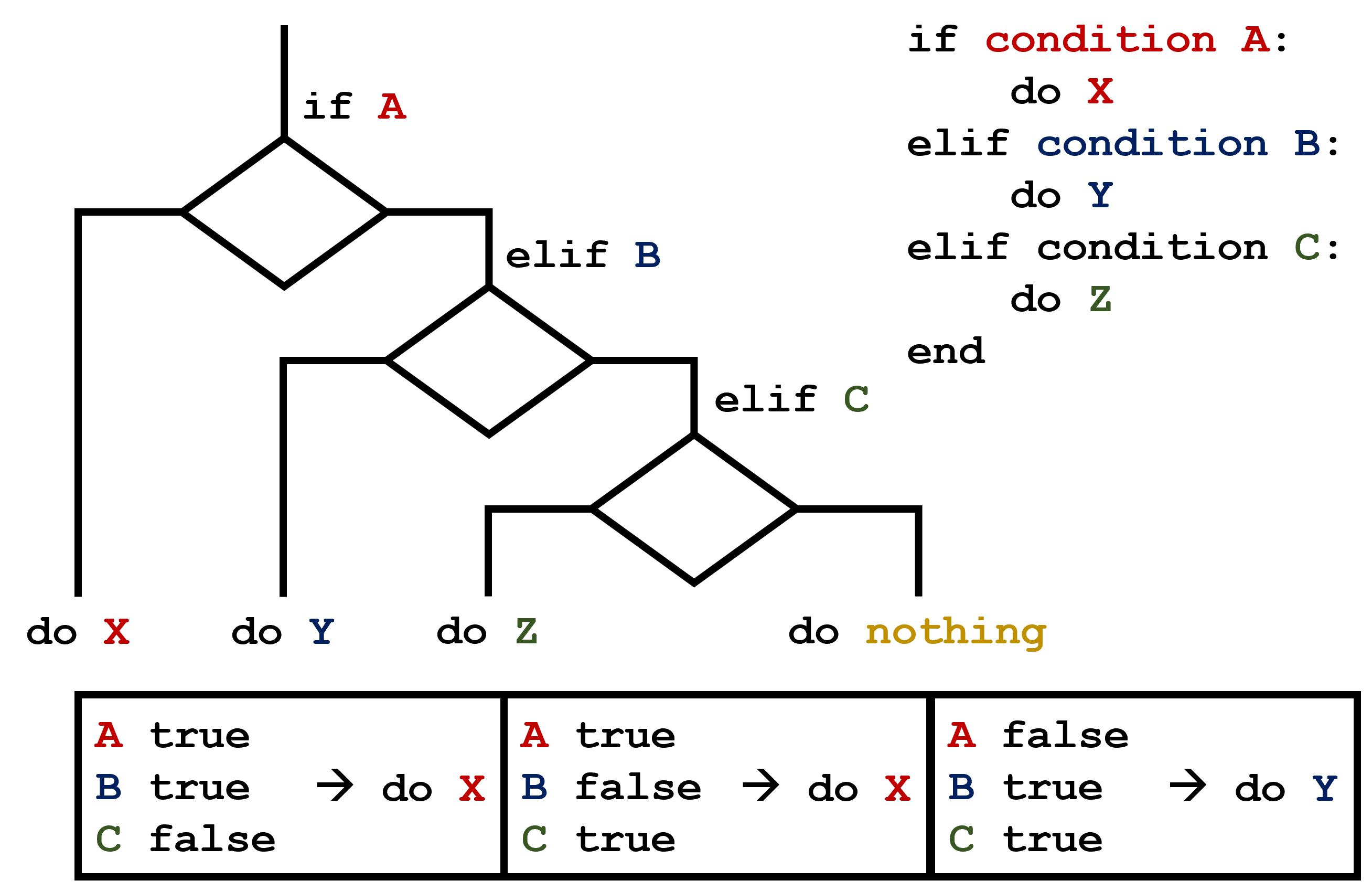
This contrasts with the case of multiple if statements, where every action can occur as long as their condition is met.

Challenge: Sorting a List Into Buckets
We’d like to break our list of files into three lists called city_files, yearly_files, and other_files, respectively.
Add code to the template below to do this. Note that the string method startswith returns True if and only if the string it is called on starts with the string passed as an argument, that is:
'String'.startswith('Str')
True
But
'String'.startswith('str')
False
Use the following Python code as your starting point:
filenames = [
    "city-3.csv",
    "city-4.csv",
    "year-1.csv",
    "year-2.csv",
    "city-2.csv",
    "sandbox.py",
]
city_files = []
yearly_files = []
other_files = []
Your solution should:
- loop over the names of the files
- figure out which group each filename belongs in
- append the filename to that list
In the end the three lists should be:
city_files: ['city-3.csv', 'city-4.csv', 'city-2.csv']
yearly_files: ['year-1.csv', 'year-2.csv']
other_files: ['sandbox.py']
Hint: fill in the blanks
filenames = [
    "city-3.csv",
    "city-4.csv",
    "year-1.csv",
    "year-2.csv",
    "city-2.csv",
    "sandbox.py",
]
city_files = []
yearly_files = []
other_files = []

for filename in filenames:
    if filename.startswith("city"):
        city_files.append(filename)
    elif filename.startswith("year"):
        _____.append(filename)
    else:
        other_files._____(filename)

print("city_files:", city_files)
print("yearly_files:", _____)
_____("other_files:", _____)
city_files: ['city-3.csv', 'city-4.csv', 'city-2.csv']
yearly_files: ['year-1.csv', 'year-2.csv']
other_files: ['sandbox.py']
Solution
filenames = [
    "city-3.csv",
    "city-4.csv",
    "year-1.csv",
    "year-2.csv",
    "city-2.csv",
    "sandbox.py",
]
city_files = []
yearly_files = []
other_files = []

for filename in filenames:
    if filename.startswith("city"):
        city_files.append(filename)
    elif filename.startswith("year"):
        yearly_files.append(filename)
    else:
        other_files.append(filename)

print("city_files:", city_files)
print("yearly_files:", yearly_files)
print("other_files:", other_files)
city_files: ['city-3.csv', 'city-4.csv', 'city-2.csv']
yearly_files: ['year-1.csv', 'year-2.csv']
other_files: ['sandbox.py']
Challenge: Counting Vowels
- Write a loop that counts the number of vowels in a character string.
- Test it on a few individual words and full sentences.
- Once you are done, compare your solution to your neighbor’s. Did you make the same decisions about how to handle the letter ‘y’ (which some people think is a vowel, and some do not)?
Hint: Fill in the blanks
vowels = '______'
sentence = 'Mary had a little lamb.'
count = 0
for character in sentence:
    if _____ in vowels:
        count = count + 1

print('The number of vowels in this string is ' + str(count))
Solution
vowels = 'aeiouAEIOU'
sentence = 'Mary had a little lamb.'
count = 0
for char in sentence:
    if char in vowels:
        count += 1

print('The number of vowels in this string is ' + str(count))
Key points
- Use
if conditionto start a conditional statement,elif conditionto provide additional tests, andelseto provide a default. - The bodies of the branches of conditional statements must be indented.
- Use
==to test for equality. X and Yis only true if bothXandYare true.X or Yis true if eitherXorY, or both, are true.- Zero, the empty string, and the empty list are considered false; all other numbers, strings, and lists are considered true.
TrueandFalserepresent truth values.
Loading last updated date...