Frequently asked questions & troubleshooting
The trouble with EnableGpkgMode()
You can only successfully run EnableGpkgMode(), that is, run EnableGpkgMode() and subsequently GetGpkgMode() and get a successful result if you have either never run InitSpatialMetadata() or you have, but you have not closed the database since.
Enable GpkgMode() forces pure Spatialite functions (like Transform()) to return GeoPakage geometry instead of the default Spatialite geometry. But if you cannot enable it, geometry will be returned as Spatialite geometry, requiring you to use the AsGPB() function to convert it to GeoPackage geometry.
Why does this happen? Because we are using Spatialite functions which require a Spatialite table, the creation of the table used for coordinate transformations makes the datatabase not a pure GeoPackage database, so when you open it after the first time you can’t enable GeoPackage mode.
Why doesn’t this happen after you run InitSpatialMetadata()? This is a mystery known only to the person who programmed it.
That seems like a not-very-big issue, but if you pass GeoPackage geometry to AsGPB(), it returns nothing.
If you are planning to write data, always check to see if:
- you get data out
- and that it is valid GeoPackage geometry, by using IsValidGPB()
This may help:
| Can EnableGpkgMode() | InitSpatialMetadata() has been run | Database closed and reopened | Geometry return type |
|---|---|---|---|
| Yes | No | Either | GeoPackage |
| Yes | Yes | No | GeoPackage |
| No | Yes | Yes | Spatialite |
My query apparently runs without error, but the window displays no results
Even if Spatialite appears correctly installed, (ie, the query SELECT spatialite_version() AS spatialite_version, HasGeoPackage() AS has_gpkg; produces a result), there may still be a cleverly hidden problem.
This can happen if the proj library, which is responsible for data projection, is is not installed or not being detected correctly. Depending on your platform, it may or may not come with your download of mod_spatialite
You can find out if proj is the problem by going to the SQL Log and looking at the error log (you can click on the image to see it full size).
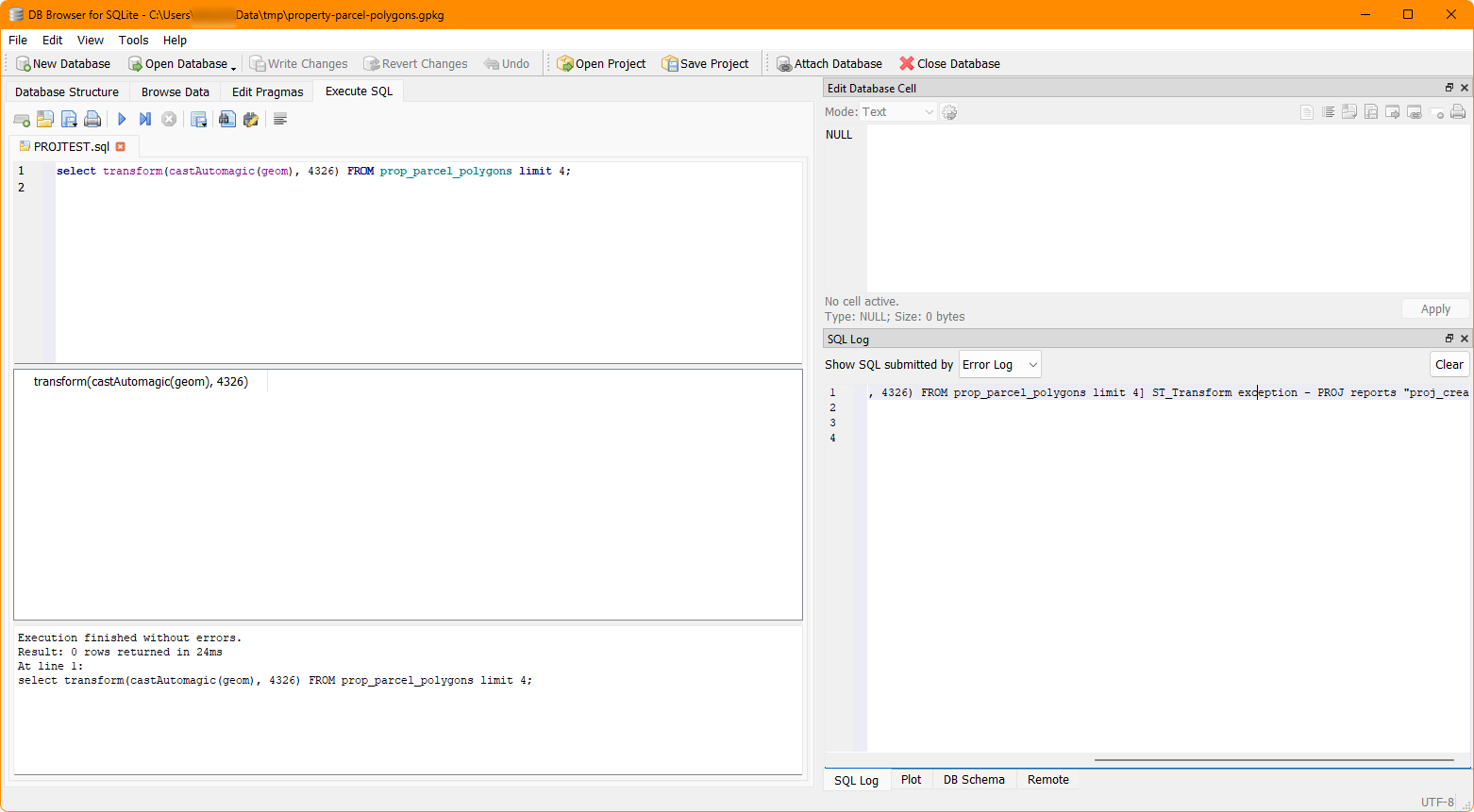
If you see something like PROJ reports "proj_create: no database context specified", this means that DB Browser is not finding proj.
While how to fix this varies by system, the problem most often occurs on Windows.
The fix:
-
Ensure that proj is installed correctly or if it’s included in the same place where
mod_spatialitelives. -
You may also (and definitely for Windows) need to have the PROJ_LIB and PROJ_DATA environment variables set to the directory which contains proj. This is [usually] the directory which contains the file proj.db.
Use whatever method you like to find that file, and then set the environment variables to point at that directory.
If you have QGIS installed, a ready-made proj directory available for use at [QGIS Installation Directory]/share/proj.
A discussion of this (although not related to this specific problem) is available here: https://github.com/pyproj4/pyproj/discussions/1262
The dataset prop_parcel_polygons table already has JSON data with lat/long points. Why are we using X() and Y()?
Yes, you can parse JSON data with SQLite so you could extract the longitude and latitude points that way, but this is a GeoPackage tutorial. And having JSON with lat/long points included is a rarity.
The eagle-eyed may notice that the values in the JSON may not be exactly the same as those calculated using X() and Y(). This can happen for a number of reasons, including, but not limited to, the original coordinate system and transformations used and floating point accuracy. For a discussion of what the difference may mean, see this Stackexchange page: https://gis.stackexchange.com/questions/8650/measuring-accuracy-of-latitude-and-longitude.
Why so much CastAutomagic()?
GeoPackage was built on Spatialite, so it’s not a uniform entity, and crucially they have different ways of storing geometry. The majority of functions use Spatialite geometry as an input. CastAutomagic() returns Spatialite geometry regardless of the input. This theoretically ensures that the data is in the form that you need. If you’re using it and your function doesn’t produce the result you expect, try removing it, because it’s designed to work with two different data types. If all the data types are the same, you don’t need to use it.
If you need GeoPackage geometry, because you’re writing it to a table, convert it back with AsGPB().
Realistically, this also means that if you forget to set the mode, or it doesn’t work, ultimately it doesn’t matter because you have complete control of the inputs.
GpkgAmphibiousMode()?
There are quite a few modes of operation for Spatialite. Amphibious mode is a rarely used, largely deprecated mode which (should) allow both Spatialite and GeoPackage modes to function. However, because it’s largely deprecated and poorly documented, you may wish to use other methods instead, such as CastAutomagic() or AsGPB().
I installed Rasterlite2 but it doesn’t work anymore!
You may need to either reinstall Rasterlite2, or worse, but more likely, compile and install your own version that works properly.
Loading last updated date...