Please be aware that as of May 16, 2026, Microsoft 365 Copilot is no longer available to UBC users following a recent change in product licensing. However, this workshop is still relevant and beneficial for institutions and/or individuals who have an active Microsoft 365 Copilot license.
Introduction to AI-Assisted Data De-identification
As AI tools become increasingly prevalent, we want to explore how effectively they can assist with the de-identification of sensitive data. While there is potential for AI to ethically support (not replace) human effort in this process, particularly when handling large volumes of data, this has yet to be established with confidence. We are not endorsing any specific AI tool, nor are we presenting AI as a dependable solution for data de-identification. Our own experiments have shown that AI is not yet capable of performing these tasks consistently and reliably. The goal of this workshop is simply to explore what AI can offer in this context.
There is no promise that the Co-Pilot agent will work properly, such as encountering errors, inconsistencies, or Co-Pilot may suddenly cease activity. You may encounter the message, “Editing with Copilot is temporarily unavailable due to high demand. Try again later or turn off edits to keep chatting with Copilot.”
Please consider these when using any kind of AI tool for research:
- UBC Risk Management has a summary of what AI tools could be used for different purposes, as approved by the PIA process. For this workshop, we will be using the Copilot M365 Embedded assistant in Microsoft 365, approved for up to high-risk data (not the Copilot M365 Chat, which has been approved only for up to medium risk data).
- Additionally, note that:
- There is a risk that the Co-Pilot M365 Embedded assistant will make errors and not de-identify all identifiers
- There is a risk that the Co-Pilot M365 Embedded assistant will alter other data that shouldn’t be changed
- Please ensure a quality assurance process after you use the Co-Pilot M365 Embedded assistant for data de-identification
As a reminder, please make sure you’re working with a duplicate/copy file of your data for this experiment and not with your original data file(s).
Terminology
UBC does not define the term “sensitive data”. Instead, UBC electronic information is classified using a schema outlined in UBC Information Security Standard U1 (ISS-U1). For the purposes of this workshop, however, we will use the term “sensitive data” to align with the terminology in Sensitive Data: Practical and Theoretical Considerations (Rod & Thompson, 2023). In this context, the term “sensitive data” will be treated as equivalent to information classified as “high risk” and “very-high risk” in UBC ISS-U1.
Table of contents
Recap: Manual de-identification methods
In our second workshop - “Introduction to Manual Data De-identification”, we introduced you to some common examples of manual de-identification methods for sensitive data. Have a look at the list below for a refresher on the types we discussed:
- Anonymization: all identifying information is removed from the dataset and cannot be restored.
- Pseudonymization: identifying information is replaced with artificial identifiers, such as codes or numbers.
- Aggregation: individual data points are grouped together into categories or ranges.
- Masking: identifying information is hidden or obscured by using techniques, such as encryption, hashing, blurring, or noise addition.
- Generalization: identifying information is replaced with more general or vague terms.
- Local suppression: individual cases or responses (individual records) are deleted.
Recap: Manual de-identification steps
As a demonstration of some of the de-identification methods, we used a dummy dataset for a mock research project looking at production efficiencies of apple growers in the Pacific Northwest. Here are the steps we did:
- Step 1: For direct identifiers, we applied pseudonymization by replacing participant names with “person1”, “person2”, and so on.
- Step 2: For birth dates, we used aggregation to replace individual dates with 5-year age ranges.
- Step 3: For geographic data, we applied pseudonymization again by replacing orchard names with “farm1”, “farm2”, and so on.
- Step 4: For data that may be linked to external sources and result in re-identification, we used anonymization by removing this data for the variables affected.
After following these steps, we received a de-identified dataset and created a separate data key file that is safely stored with the research records.
We are now going to replicate our second workshop on manual de-identification methods using Co-Pilot, to see its capabilities in assisting with the de-identification process. Microsoft Copilot is an AI-powered assistant embedded directly across the Microsoft ecosystem, including Windows and Office 365.
Here is the same dummy dataset for you to download and use for this workshop.
Using the MS Co-Pilot embedded assistant to help with data de-identification
- Navigate to MS Excel 365 on your web browser to access Co-Pilot as an embedded assistant, not the desktop application, because Co-Pilot is not available there. You may need to log in with your UBC CWL.
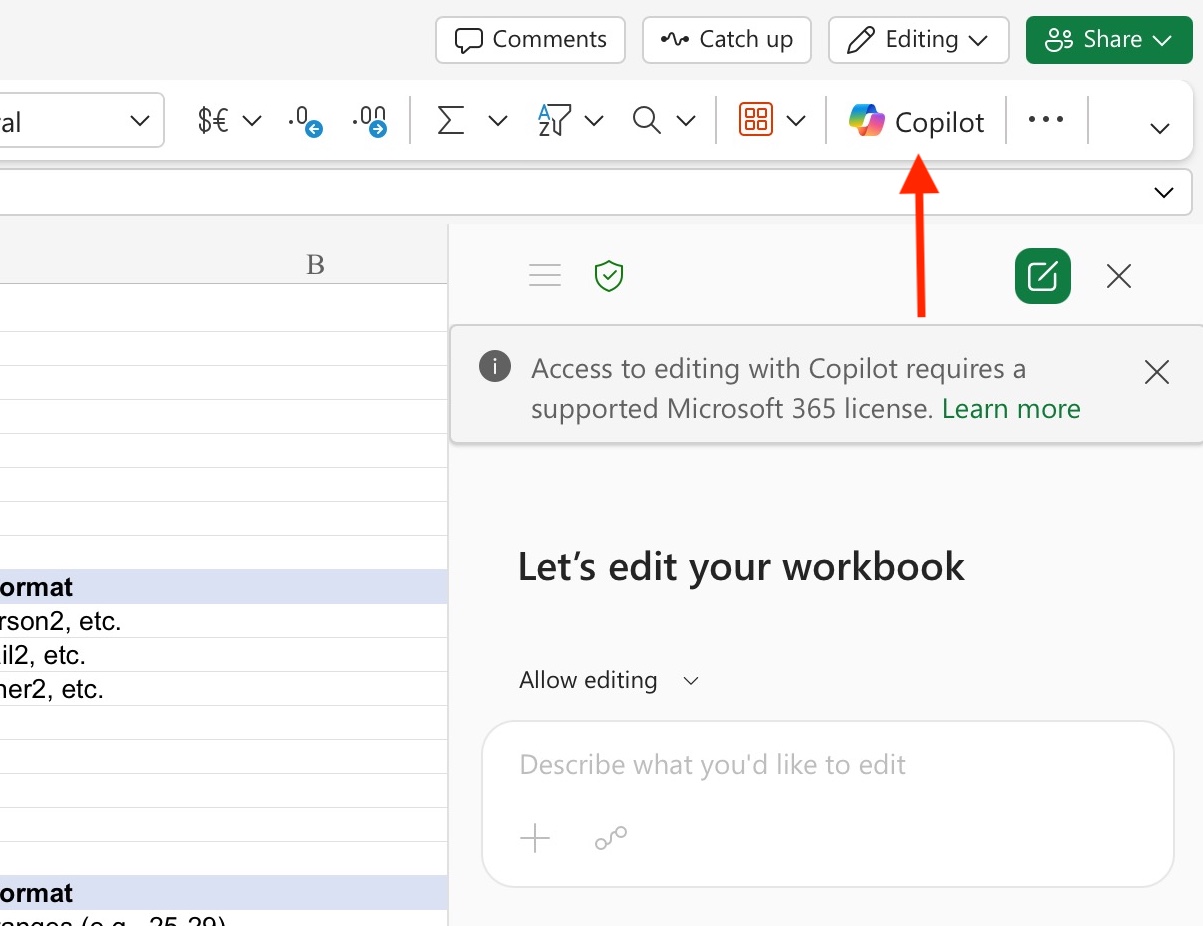
- In your toolbar, find and select the Co-Pilot icon. A new chat should open.
- Near the text entry box, find and select the “options” icon to activate “Edit with Co-Pilot”. This will ensure Co-Pilot makes changes directly to your duplicate file and does not generate a new file each time.
Some prompting tips to note before proceeding
- It’s always best to be as clear as possible when prompting Co-Pilot. This can include specifying which variables will be modified, what exactly will happen to them, and what they will be replaced with (if using pseudonymization, aggregation, masking, or generalization). For example, if you use anonymization, specify exactly that the task is to remove variable data. If not specified, Co-Pilot will randomly decide and apply another de-identification method, such as aggregation or local suppression.
- In your prompt, you should specify to place the de-identification results in a new sheet. If not, Co-Pilot will apply changes directly to the original sheet. You can also name the new sheets by prompting for and indicating what you want the sheet name to be.
- To create a data key file for your original raw data, we found (by a lot of trial-and-error) that it’s best to finish all de-identification methods and then prompt for a data key file. You may run into issues, such as incorrect data key updates, as you move along the de-identification process.

Replicating manual de-identification methods with Co-Pilot M365 Embedded assistant
Here are the same steps as the manual de-identification methods workshop. Each step has a suggested prompt you can use for Co-Pilot, and the output you may receive.
Step 1: Direct identifiers
Co-Pilot may not be able to recognize direct identifiers automatically, so we made sure to explicitly indicate which specific variables are direct identifiers. We then told it what kind of pseudonyms we want the variable data to be replaced with, and to put the results in a new sheet.
Here is the prompt: The direct identifiers are worker_id, email_id, and owner_id. Apply pseudonymization to replace the values of each direct identifier with pseudonyms such as person1, person2, person3, etc. for worker_id, email1, email2, email3, etc. for email_id, and owner1, owner2, owner3, etc. for owner_id. Put the results in a new sheet called “Direct identifiers”. Do not change other variables, such as age, for now.
The Co-Pilot response may look like: (Click to expand image) 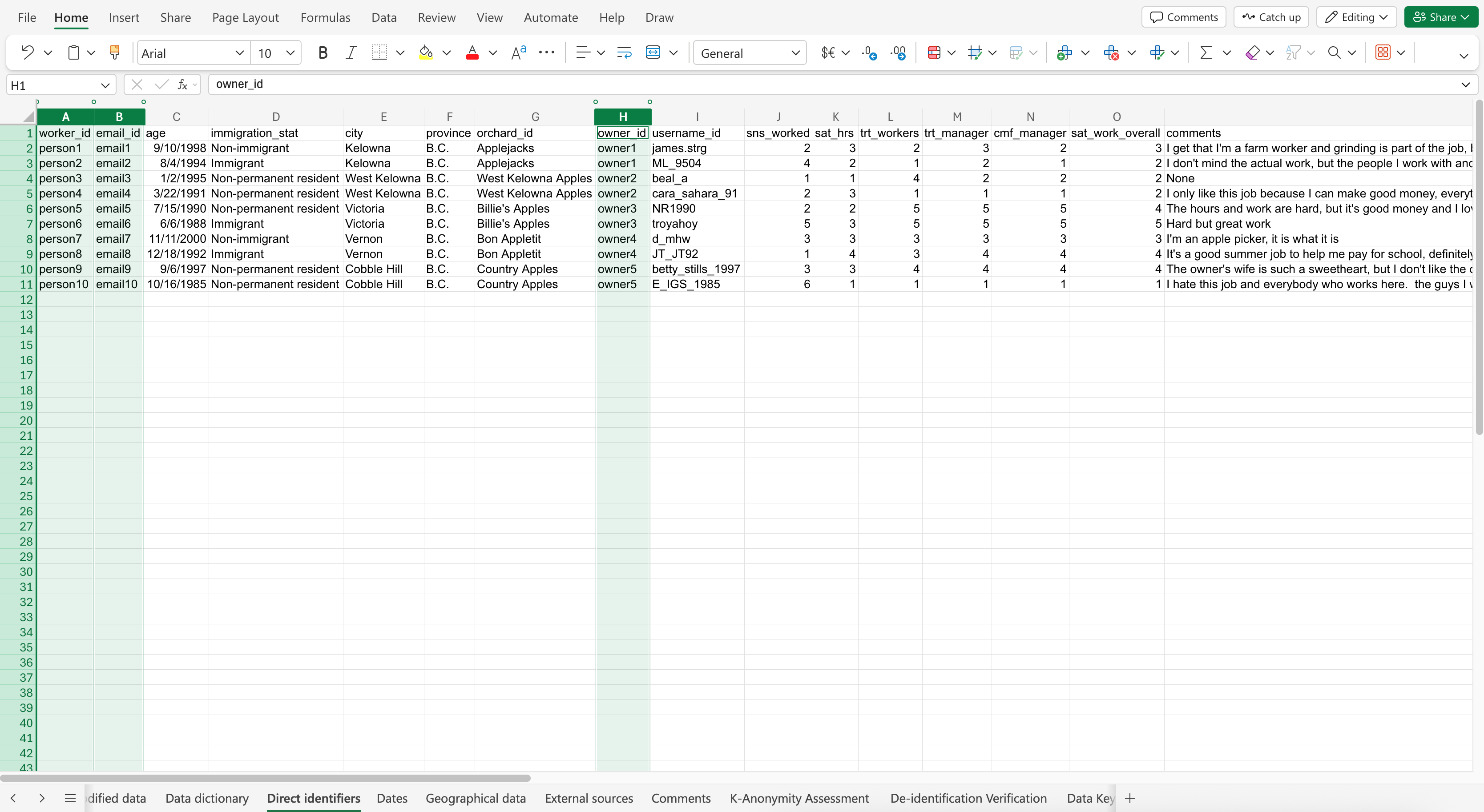
Step 2: Dates
Before prompting, make sure your dates are in a preferred format with a consistent style, such as ISO 8601 (YYYY-MM-DD). However, please note the limitation that although you may prompt Co-Pilot to format your dates in a certain style, it may not always be successful. It may take some trial and error, or not work at all.
Here is the prompt: The variable “age” contains identifiable information. Apply aggregation to replace the values with 5-year age ranges. Put the results in a new sheet called “Dates”.
The Co-Pilot response may look like: (Click to expand image) 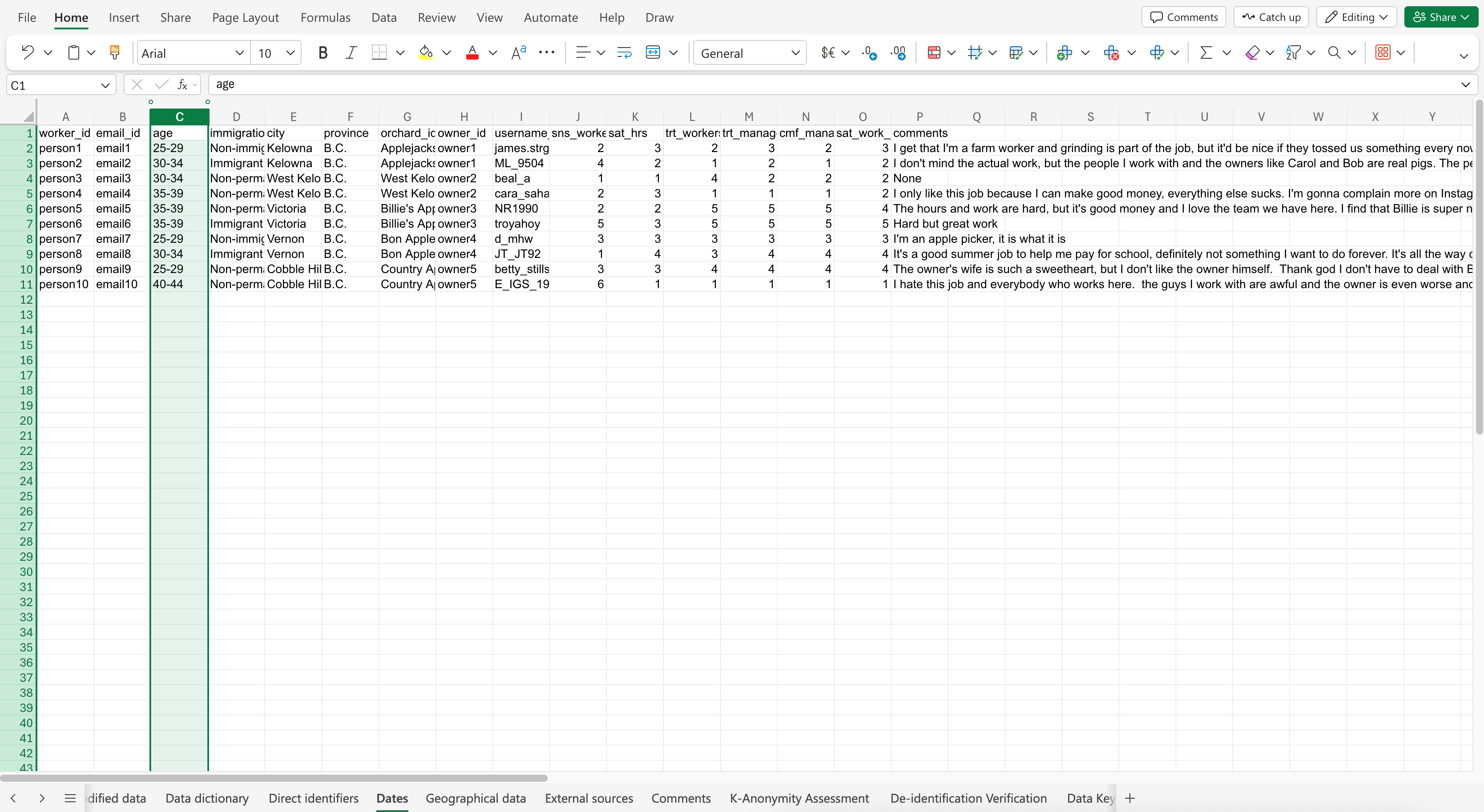
Step 3: Geographic data
Similar to step 1, we specified what pseudonyms we want to be used as replacements for geographic variable data, and to put the results in a new sheet.
Here is the prompt: The variables “city” and “orchard_id” contain identifiable geographic data. Apply pseudonymization to replace the values of each variable with pseudonyms such as city1, city2, city3, etc. for city, and orchard1, orchard2, orchard3, etc. for orchard_id. Put the results in a new sheet called “Geographical data”.
The Co-Pilot response may look like: (Click to expand image) 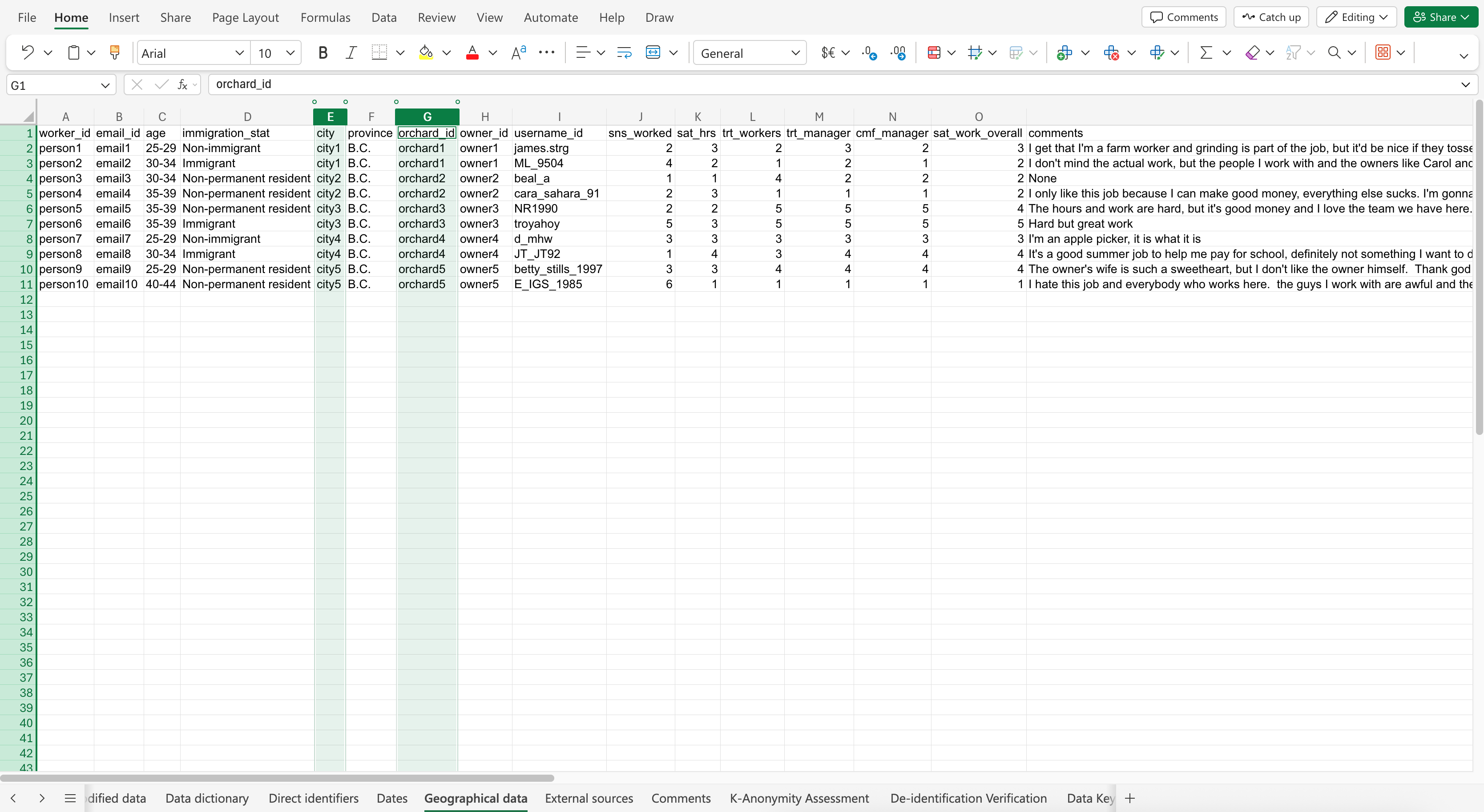
Step 4: Data potentially linked to external sources
These variables could also link to publicly accessible sources of data and be re-identified. We specified to Co-Pilot which variables will be removed for the anonymization process. As a reminder, you should clearly convey what task(s) will be done as part of the anonymization prompt, or Co-Pilot will randomly select and apply a method.
Here is the prompt: The indirect identifiers are immigration_stat and username_id. Apply anonymization to remove these variables and its values. Put the results in a new sheet called “External sources”.
The Co-Pilot response may look like: (Click to expand image) 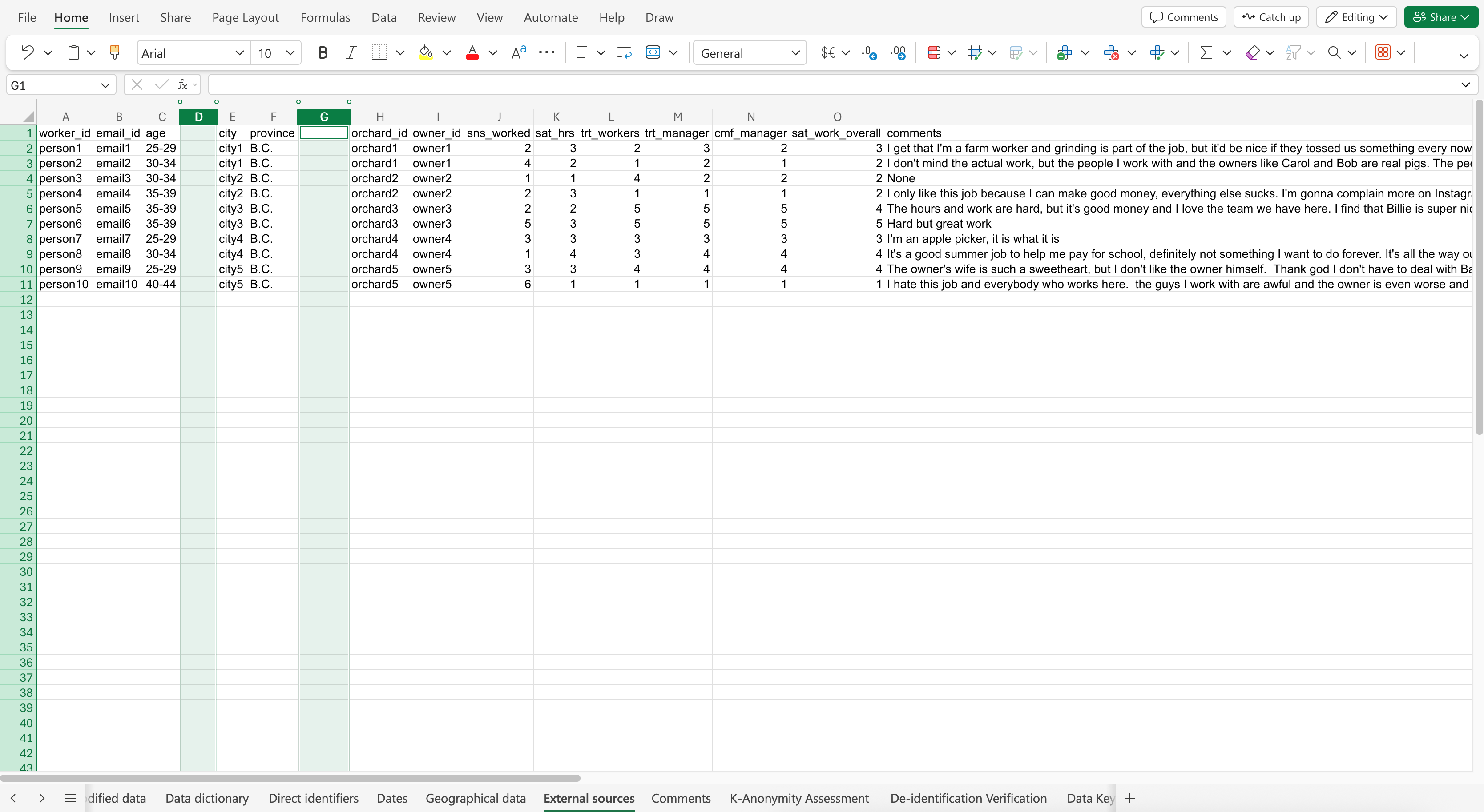
Step 5: Participant comments
Participant comments from a survey or interview, for example, can contain identifying information that can reveal identities, especially when paired with other variables containing identifying information. Depending on the context, all or part of the comment(s) may be removed (fully anonymized), pseudonymized, masked, or locally suppressed. We specified to Co-Pilot to scan each comment record for names, orchard names, social media usernames, dates of birth, cities, provinces, and emails
Here is the prompt: The “comments” variable contains identifying information. Scan each comment record for names, orchard names, emails, dates of birth, cities, provinces, social media usernames, and immigration status, and anonymize those pieces of information by removing them. Put the results in a new sheet called “Comments”.
The resulting de-identified dataset & k-anonymity assessment
Although the final product may be a de-identified dataset, we can’t be sure that it has been sufficiently de-identified enough for sharing or publishing. However, we can prompt Co-Pilot to assess the k-anonymity of the data.
Here is the prompt: Assess the data for k-anonymity by determining the k value. Is the determined k value acceptable?
The Co-Pilot response may look like: (Click to expand image) 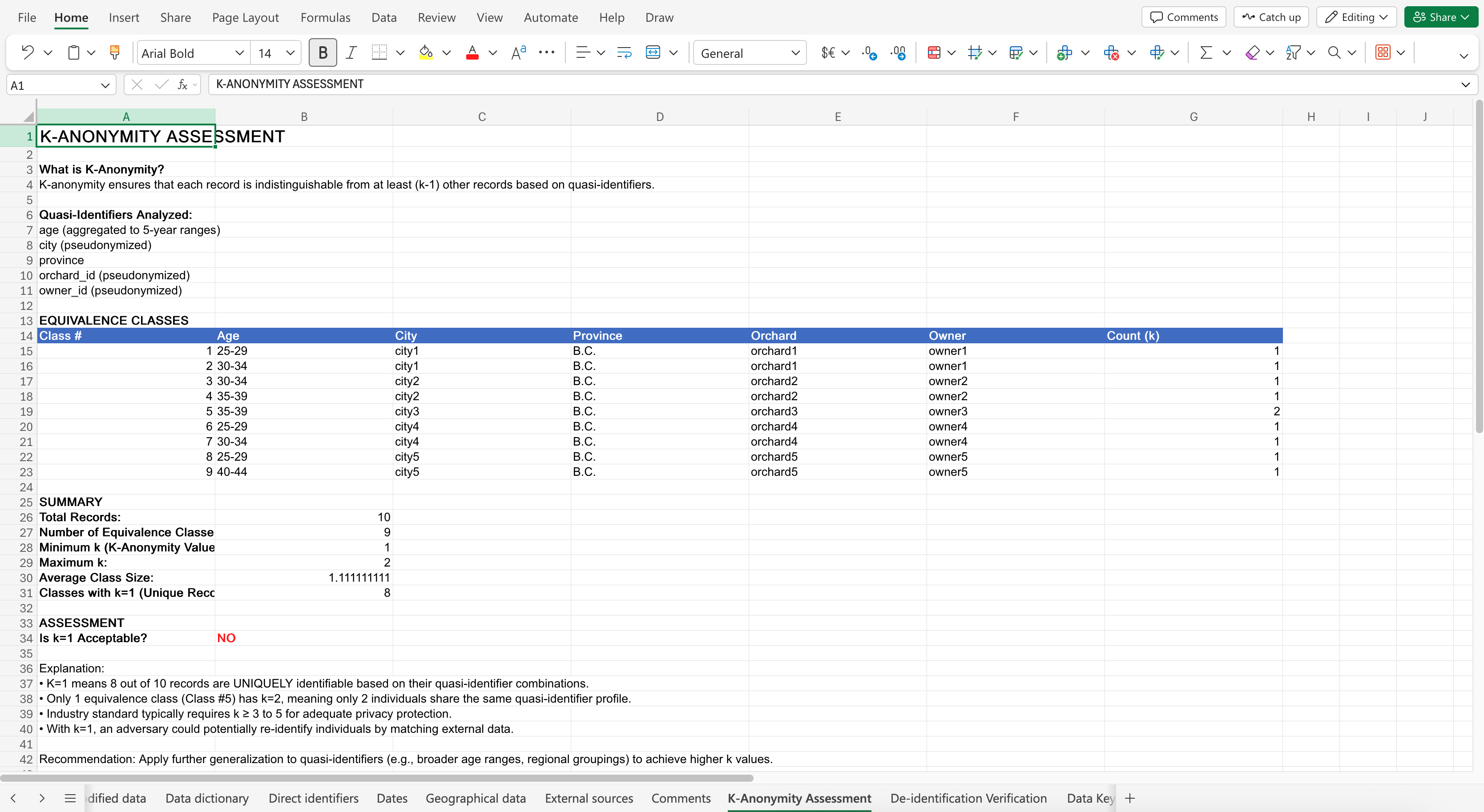
Remember that a k-value of 1 is unacceptable in real life, but for the purpose of this workshop, we’ll keep it because it’s only a dummy dataset with fake participants. Achieving a k value of 3 or 5 would be good in real life.

Creating the data key
A data key is created so we, or another researcher, can know (re-identify) the original participant information prior to de-identification. Because this file contains sensitive, identifiable information, it must be stored separately from the dataset, protected with encryption or a password in order to not compromise participant confidentiality and cause harm.
Here is the prompt: Create a separate data key sheet that stores the original identifiable data of variables worker_id, email_id, age (follow YYYY-MM-DD format), immigration_stat, city, orchard_id, owner_id, username_id, and comments with the corresponding de-identified data of the variable.
You may notice that the date format is not in the ISO 8601 format, even if we prompted for it. This is an interesting limitation to observe. In this case, you should be extra careful and pay attention to Co-Pilot’s outputs, even if you explicitly prompt for it.
The Co-Pilot response may look like: (Click to expand image) 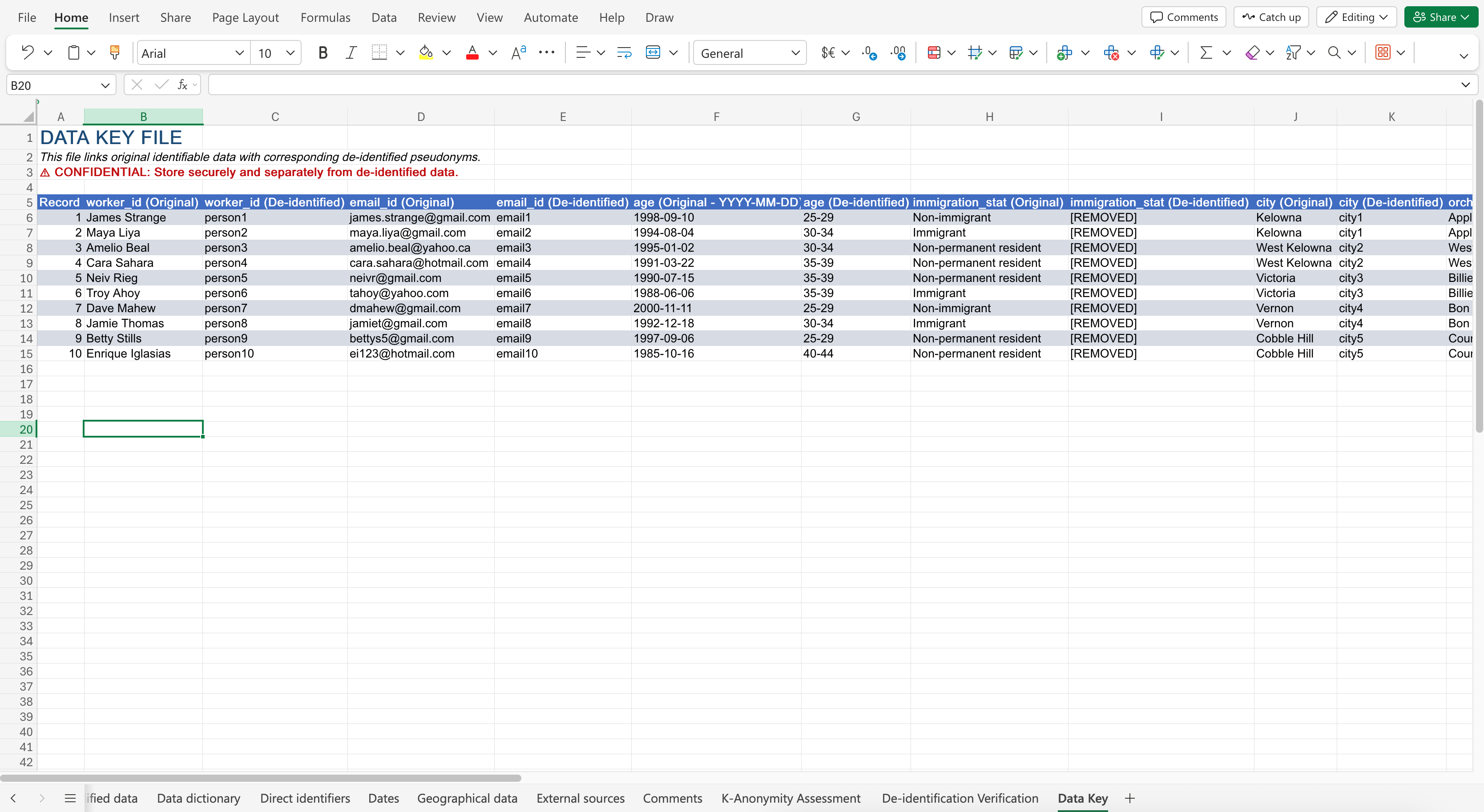
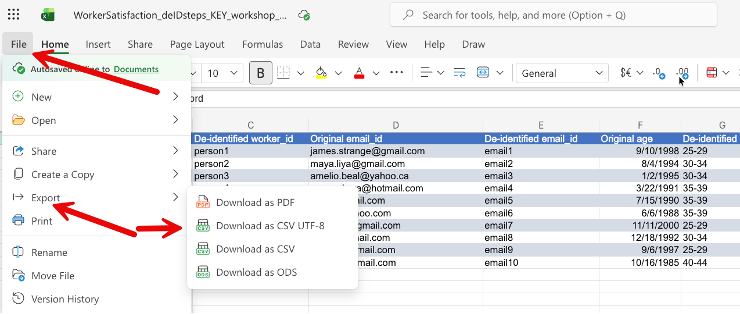
Now we need to separate the data key sheet into a stand-alone protected file. To move an Excel 365 online sheet to a new file, the easiest method is to export a sheet into a CSV file. Go to File > Export > Download as CSV UTF-8 to save the data key as a stand-alone .csv file to your computer, and save it in a secure location, such as UBC OneDrive.
Quality assurance: Checking for errors and consistency
From our experimentation in Spring 2026, we see that we can’t completely trust that the Co-Pilot M365 Embedded assistant tool being used will produce consistent and reliable results.
To check, we can create a quality assurance prompt to flag possible errors, inconsistencies, or missed records that weren’t de-identified. Similar to the previous prompts, we should specify which variables we want to include in the quality assurance assessment.
Here is the prompt: Verify that this dataset sheet “Comments” has been properly de-identified by: scan the direct identifier variables “worker_id”, “email_id”, and “owner_id” for any identifying names and emails, scan the variable “age” for any individual dates of birth, scan the geographic variable “orchard_id” for any workplace names or full addresses, scan the indirect identifiers “username_id” and “immigration_stat” for any social media usernames and indicated immigration status, and scan the variable “comments” for any identifying information like names, orchard names, emails, dates of birth, cities, provinces, social media usernames, and immigration status. Flag any anomalies and any combination of variables that could re-identify a participant.
The Co-Pilot response may look like: (Click to expand image) 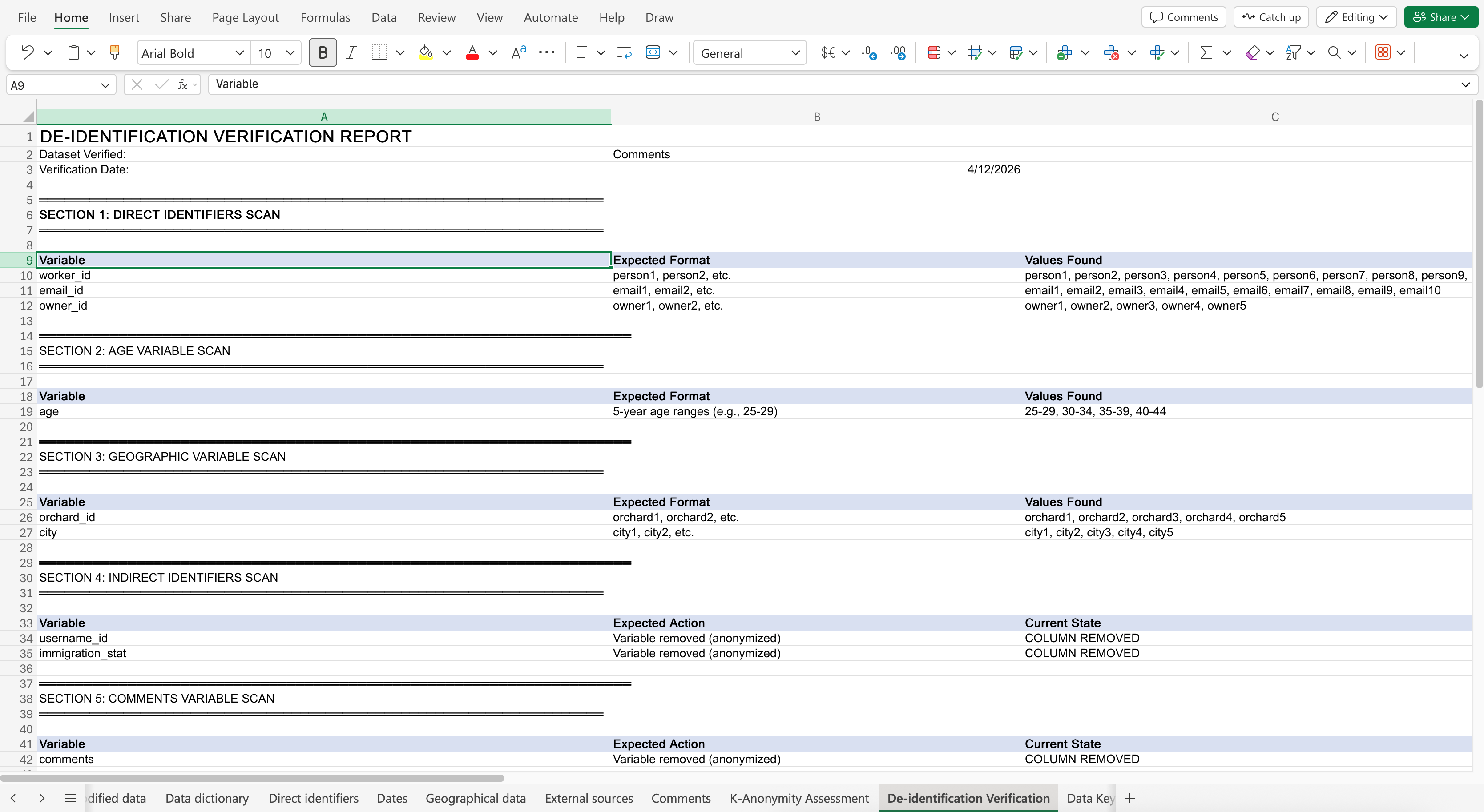
Here’s a breakdown of what we covered: We replicated our manual de-identification methods workshop using Microsoft Co-Pilot as an embedded assistant in Excel. When prompting Co-Pilot, we want to be as clear and specific as possible by indicating which variables are affected and what methods will be applied. However, although there may be potential for AI tools like Co-Pilot to help improve the efficiency of the data de-identification process, we conclude that it remains an unreliable method. There are issues like inconsistent and incorrectly formatted outputs, leading to mistakes and possible participant re-identification and privacy violations. If you decide to engage with an AI tool, please do so with caution by evaluating and checking its accuracy.
Congrats!
Hooray! You now know the complex considerations of using AI as a tool to help with data de-identification and have some experience using an AI tool to help with the de-identification process of data.
Sources
- Rod, A. B. & Thompson, K. (2023). Chapter 13: Sensitive data: Practical and theoretical considerations. https://doi.org/10.5206/EKCH6181
Extra information that may be helpful
- Data Privacy Office Europe. (2025). AI for data privacy and compliance: Prompt engineering for DPOs. https://data-privacy-office.eu/ai-for-data-privacy-and-compliance-prompt-engineering-for-dpos/
Loading last updated date...